How to automatically apply a WooCommerce URL Coupon when using W3 Total Cache
The WooCommerce URL Coupons is a great extension that allows you to set up a unique URL (ex. https://2025.zen.agency/trysave20) and automatically apply product or cart discounts without the need for your customers to enter an actual coupon code. Using the page redirect option, you are able to redirect customers to a page after visiting the unique URL.
While setting up the extension, I found an issue that can arise for website owners who are running any type of caching plugin on their website. The issue breaks the coupon functionality when the caching plugin caches the unique URL you’ve chosen. We happen to use W3 Total Cache, and luckily, there is an easy fix by following the 2 steps outline below:
- Create a unique prefix to be used for all your URL couponsFor this demonstration, let’s use “coupon/”. So, instead of my unique URL being https://2025.zen.agency/trysave20, it will carry the coupon/ prefix and be called https://2025.zen.agency/coupon/trysave20

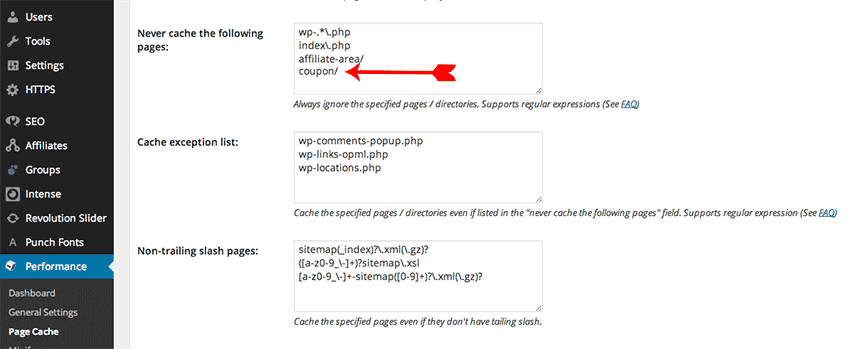
- Modify W3 Total Cache to NOT cache any requests with the coupon/ prefixThis setting can be found under Performance>Page Cache. Scroll to the bottom of the page and you will see “Never cache the following pages”. Just add coupon/ to the text box.